
Burn Rate Calculator for Professional Business Analysis
Use this focused burn rate calculator, a critical capital planning tool designed for founders, financial analysts, CFOs, and venture investors. Capital burn rate measures the rate at which a company consumes its cash reserves to cover operating expenses before generating positive cash flows from operations.
This online tool calculates Gross Burn, Net Burn, Average Monthly Burn, and remaining Cash Runway. By integrating multi-scenario models, sensitivity matrices, and down-stream runway simulations, this page provides a comprehensive framework to support your capital allocation and treasury decisions.
Have a suggestion or found a calculation discrepancy? Let us know!
How to use this burn rate calculator
Choose the right calculation mode
Begin by selecting the calculation method that matches your operational focus. Use the standard Gross Burn mode to track gross cash outflows. Choose Net Burn to measure the difference between inflows and outflows, or select Average Monthly Burn to average multiple operational cycles over the period.
Enter reliable input assumptions
Input starting cash, ending cash, inflows, and outflows. Ensure that all figures match the same time period. If you are modeling a startup, separate your recurring SaaS revenues from one-time financing events to keep your operational burn rate clean and auditable.
Review the result and diagnostics
After filling in the details, click the calculate button. The calculator yields your gross and net burn rates alongside an implied cash runway. Check the diagnostics card to inspect for efficiency ratings like the Burn Multiple, which indicates the quality of your sales efficiency.
Your burn rate results
Primary result
The primary result highlights your Net Monthly Burn Rate, calculated from starting and ending cash balances. If cash decreased, this is positive, showing consumption. If cash increased, the result is negative, indicating a cash-positive operational state.
Result components
Our dashboard isolates cash runway, monthly gross burn, and total cash consumed. It displays the FCF-equivalent monthly burn and operating expense benchmarks, showing exactly how long your current cash balance can sustain operations.
Output quality checks
Our diagnostic engine flags inconsistencies. If ending cash exceeds starting cash but outflows are high, the system prompts you to verify if financing cash flows were mixed with operating revenues, ensuring commercial decision integrity.
Calculation modes
Gross Burn
Gross Burn isolates the total monthly cash outflows of the business, disregarding incoming revenues. It measures the absolute cost of keeping the company's doors open, including salaries, rent, software licenses, and manufacturing expenses.
Net Burn
Net Burn measures the true monthly cash drain of the company, subtracting cash inflows from cash outflows. This mode provides a realistic view of how fast your cash reserves are declining, directly determining your cash runway.
Average Monthly Burn
Average Monthly Burn averages fluctuations over multi-month periods. By analyzing changes over longer windows, it smooths out quarterly payments or one-time capital expenditures, giving you a stabilized operational cash run-rate.
Compare scenarios
Cost Control scenario
The Cost Control scenario simulates an operating environment where the business cuts gross cash outflows by 15%. This models the expansion of your cash runway under disciplined capital management, preserving runway for market recovery.
Base Plan scenario
The Base Plan scenario utilizes your current operating cash inflows and outflows as-is. It serves as your baseline trajectory, illustrating your runway length if current marketing, hiring, and sales metrics remain constant.
Growth Spend scenario
The Growth Spend scenario models an aggressive case where cash outflows increase by 25%. This helps founders and investors visualize how accelerating sales campaigns or product development impacts cash runway and timeline safety.
Sensitivity analysis
Monthly expenses sensitivity
This table measures how changes in monthly outflows impact gross burn and runway, keeping other variables constant. It highlights how cutting operational expenses by 10% or 20% extends your company's survival timeline.
Collected revenue sensitivity
We run sensitivity loops across different cash-basis collections. This illustrates the risk of revenue shortfalls, showing how a 10% decrease in customer payments accelerates cash consumption.
Hiring plan sensitivity
Hiring plan sensitivity models the financial impact of adding FTEs. Assuming an average loaded monthly cost of $8,000 per hire, it illustrates how scaling your workforce reduces your runway months.
Formula and methodology
Core formula
The primary net burn calculation uses beginning and ending cash balances:
Adjusted formula
When using flow metrics, the calculator derives net burn rate as: Net Burn = (Cash Outflows - Cash Inflows) / Months. Gross burn rate focuses solely on total outflows: Gross Burn = Cash Outflows / Months. Implied runway is calculated as: Runway = Ending Cash / Net Burn.
Rounding and period rules
All calculations maintain floating-point precision to prevent rounding errors. Runway outputs are rounded to one decimal place, while cash amounts are rounded to the nearest dollar. Ensure all inputs correspond to the same timeframe to guarantee accurate runway results.
Example calculation
Example inputs
Let us assume a business starts a quarter with $500,000 in Cash and ends with $350,000. During these 3 months, it records $200,000 in cash outflows and collects $50,000 in revenues.
Step-by-step result
Applying the core FCF and burn formulas:Gross Monthly Burn = $200,000 / 3 = $66,667 / monthNet Monthly Burn = ($500,000 - $350,000) / 3 = $50,000 / monthImplied Cash Runway = $350,000 / $50,000 = 7 months
Interpretation of the example
This startup is burning $50,000 net monthly, leaving them with exactly 7 months of runway. To extend this runway, the business must increase customer collections, secure external funding, or reduce monthly gross spending before cash is depleted.
What this result means
Stronger result interpretation
A low net burn rate or positive net cash flow indicates high capital efficiency. The business is generating enough revenue to cover its expenses, reducing the risk of insolvency and giving founders leverage during investment negotiations.
Weaker result interpretation
A high net burn rate coupled with a short runway is a critical warning. It indicates the business is consuming cash faster than it is collecting revenue, requiring immediate adjustments to prevent cash depletion.
Operational or transaction context
During venture capital audits, investors inspect the Burn Multiple (Net Burn / Net New ARR). A multiple below 1.0x indicates outstanding capital efficiency, while a multiple above 2.5x suggests high customer acquisition costs.
Data quality and source rules
User-entered data
When entering cash balance data manually, use figures directly from your bank statements or accounting ledgers at the beginning and end of the period. Manual inputs are marked as User Input in your history.
Imported calculation data
You can import revenue or opex figures from related calculators like Working Capital or SaaS Valuation. If values are imported, the source calculation name, timestamp, and field values are preserved in the snapshot.
Third-party reference data
When evaluating your burn rate efficiency against SaaS industry benchmarks, check the reference publication date. Industry benchmarks serve as general guidelines, not personalized financial advice.
Continue your analysis
Related calculator workflow
Your monthly net burn rate is the core input for cash runway projections. Use the workflow integration buttons below the results to export your metrics directly to our cash runway simulation modules.
Open Runway Calculator →Saved result workflow
Save your calculations to your dashboard to build a historical timeline of your company's capital efficiency. This allows you to track burn rate trends over multiple quarters.
Report workflow
Generate a professional PDF memorandum of your burn rate analysis. The premium report includes detailed sensitivity matrices, scenario comparisons, and hiring projections ready to present to partners or board members.
Common mistakes
Mixing definitions
Confusing Gross Burn with Net Burn is a common mistake. If a company spends $100k but collects $80k in revenue, its Gross Burn is $100k, but its Net Burn is only $20k. Relying on gross burn for runway calculations can lead to overly pessimistic projections.
Ignoring one-time items
Including non-recurring events like venture capital funding or asset purchases in operating cash flows can skew your calculations, masking your company's true monthly cash consumption.
Comparing mismatched periods
Comparing quarterly cash inflows against monthly outflows can lead to incorrect runway calculations. Ensure that all figures correspond to the same timeframe before executing your calculations.
Dashboard and saved calculations
Saved scenario snapshots
Save complete scenario snapshots (including inputs and outputs) directly to your account. This makes it easy to review and audit past valuation decisions. For Burn Rate Calculator, apply this guidance to cash flow, margin, growth, debt, and return assumptions, then compare the result against finance-ready ratios, dollar impacts, and decision thresholds.
Restoring inputs
Restore previously saved cash flow metrics with a single click. Our session-state integration recovers inputs automatically, letting you resume your work exactly where you left off.
Exporting reports
Export your saved calculations into structured PDF executive memos. These reports are formatted to professional standards, ensuring your findings are ready to present to partners or clients. For Burn Rate Calculator, apply this guidance to cash flow, margin, growth, debt, and return assumptions, then compare the result against finance-ready ratios, dollar impacts, and decision thresholds.
Real-world case study: Moderna, Inc. (MRNA, FY 2023)
Moderna, Inc. metrics profile
Moderna, a prominent biotechnology company, experienced significant cash burn in fiscal year 2023 due to ongoing research and development investments and a decrease in COVID-19 vaccine sales. This scenario provides a clear example for analyzing burn rate and cash runway for a growth-oriented firm in a capital-intensive industry.
Moderna's substantial monthly cash burn of approximately $214.08 million in FY 2023, driven by significant operating expenses and R&D, indicates a company in a heavy investment phase. With $3.614 billion in cash and cash equivalents, their calculated runway of nearly 17 months suggests a critical period for achieving key pipeline milestones or securing additional funding. For investors, this highlights the importance of monitoring clinical trial progress and future revenue streams to ensure the company can sustain its operations until new products generate significant cash flow. This burn rate is typical for biotech firms heavily invested in R&D, but requires careful management to avoid liquidity issues.
Related Calculators
Estimate weighted average cost of capital.
Open Tool →DCF CalculatorValue a business using discounted cash flows.
Open Tool →NPV CalculatorCompute net present value of cash flows.
Open Tool →IRR CalculatorSolve project internal rates of return.
Open Tool →Free Cash Flow CalculatorEstimate operating free cash flow.
Open Tool →Break-Even ROI CalculatorAnalyze payback thresholds and returns.
Open Tool →Related Articles & Guides
 Corporate Finance
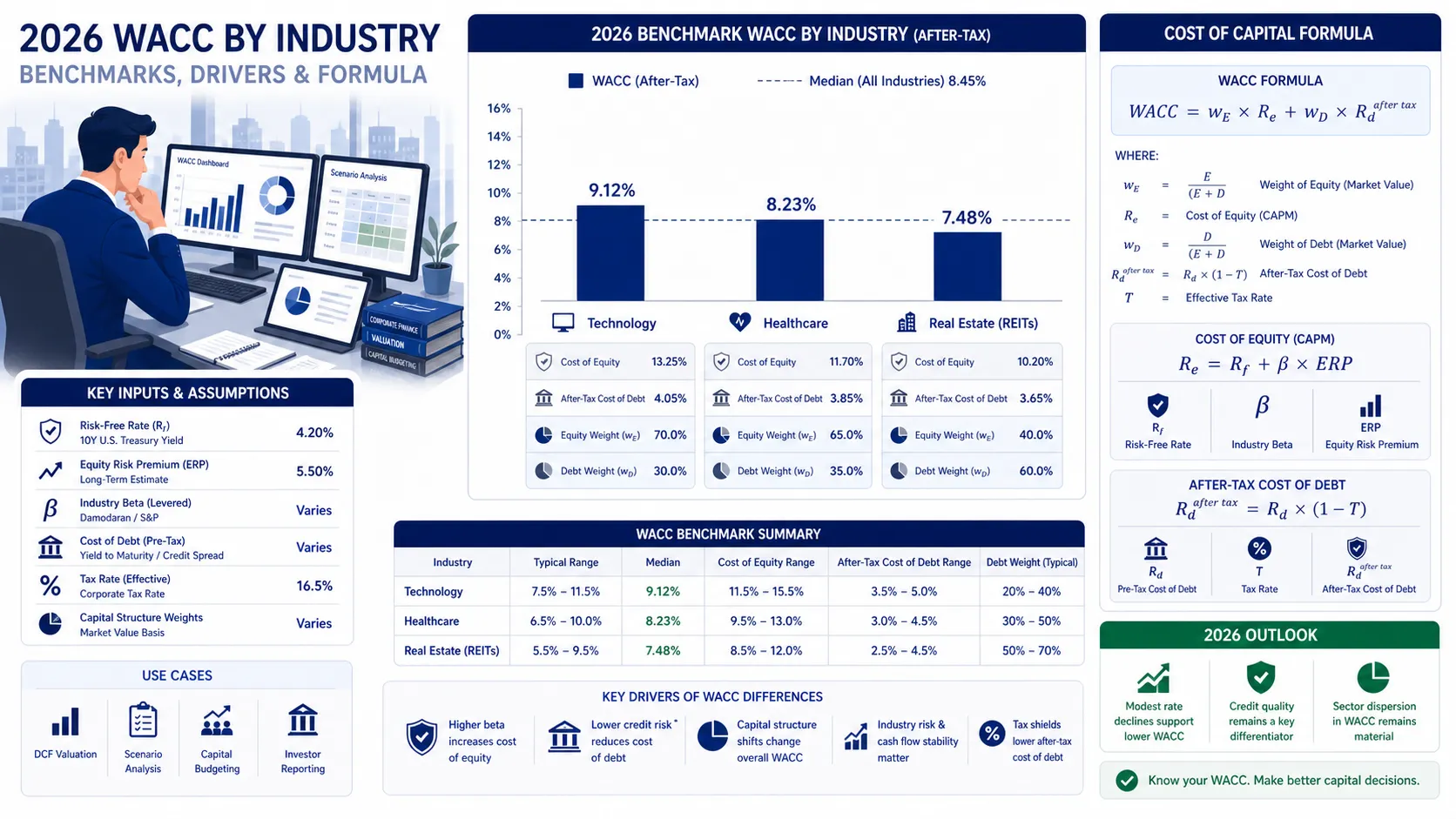
WACC by Industry: 2026 Benchmarks for Technology, Healthcare, and Real Estate
In 2026, industry WACC diverges sharply, from 5.5% for utilities to over 11.5% for software. CFOs must benchmark their discount rate against peers to ground valuations in market reality.
 Corporate Finance
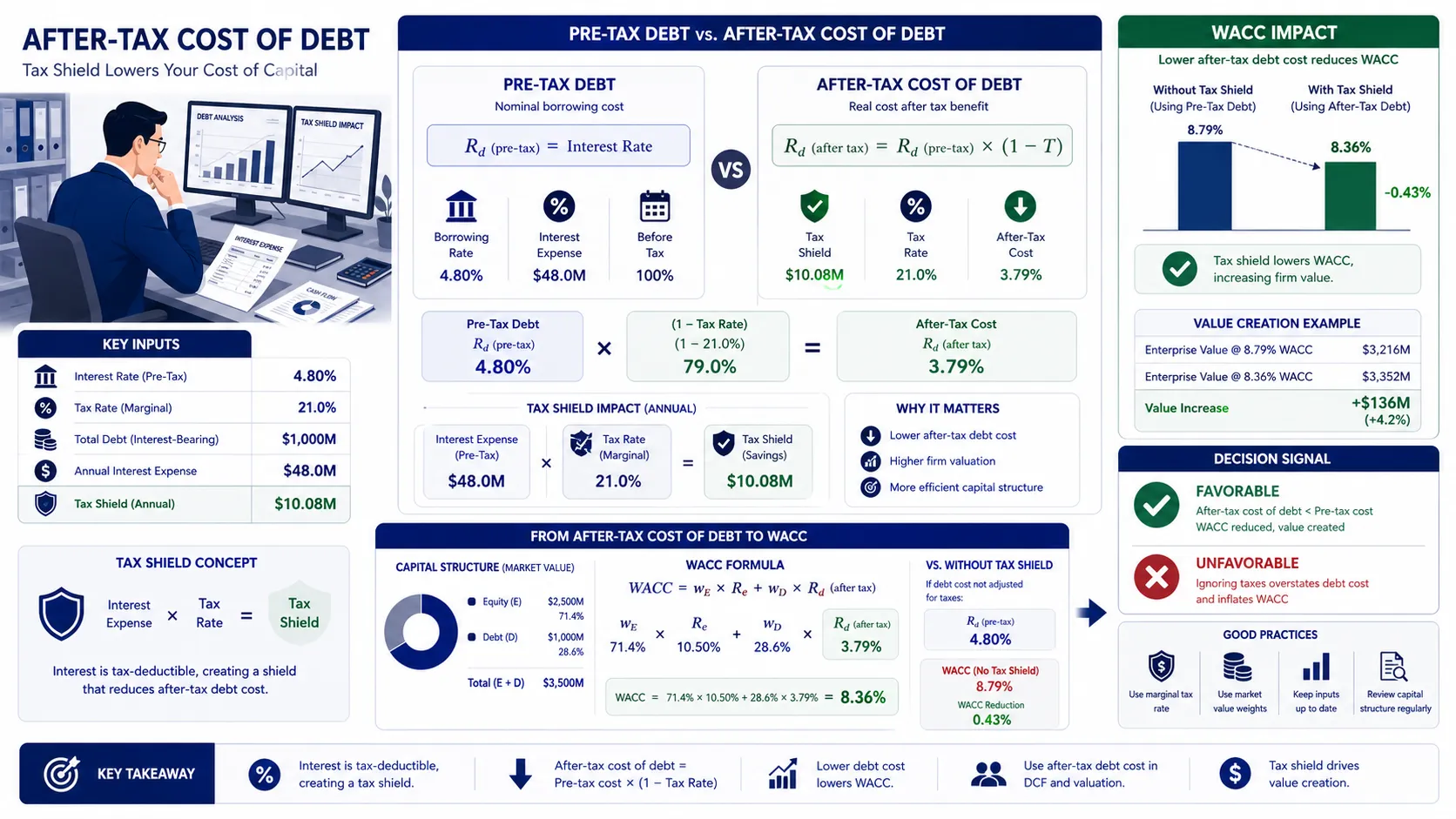
What Is After-Tax Cost of Debt and How Does It Lower WACC?
Interest payments are tax-deductible, making debt cheaper than equity and lowering your company's WACC. The after-tax cost of debt reveals this true, subsidized borrowing rate.
 Corporate Finance
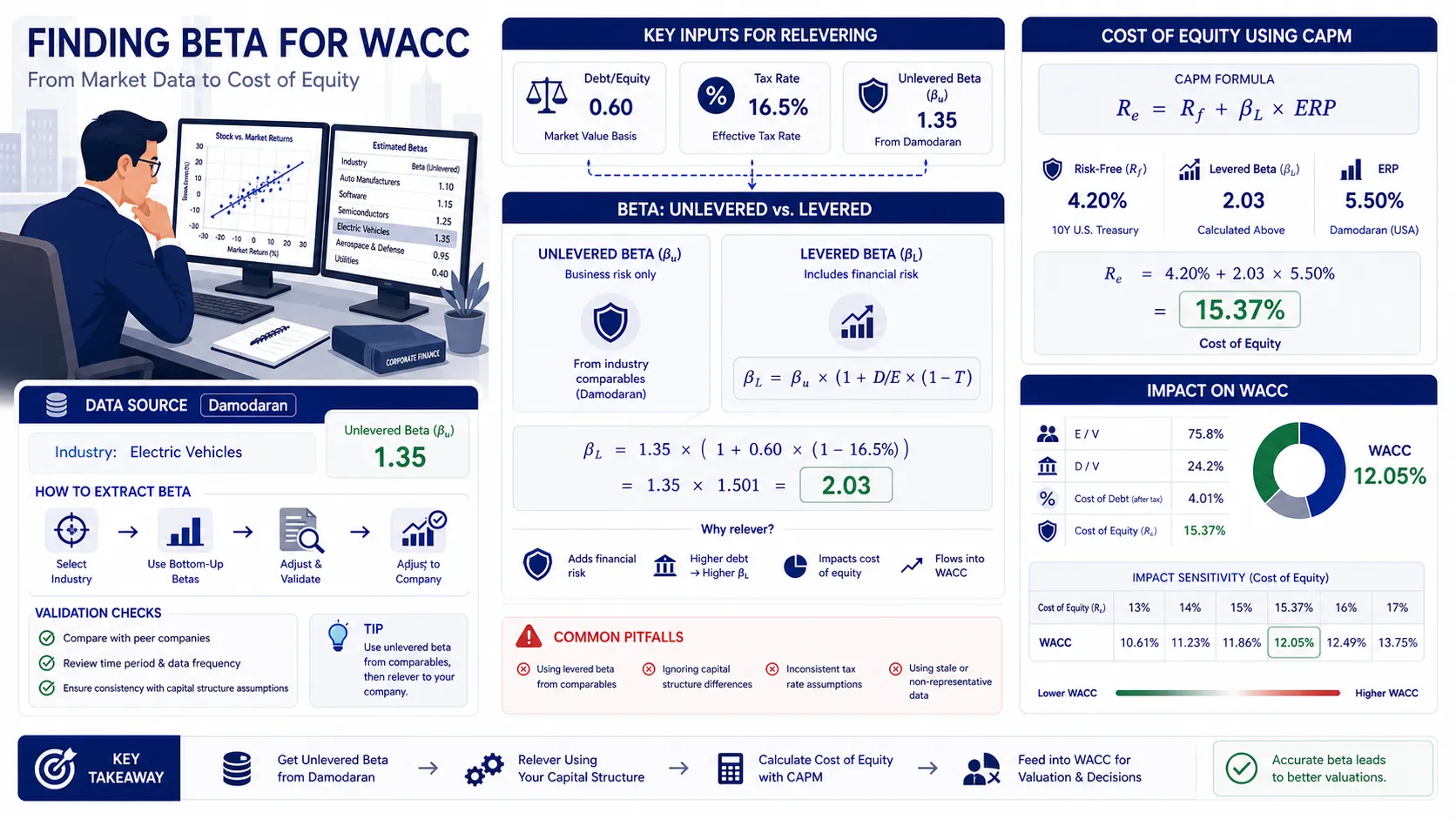
How to Find Beta for WACC: Unlevered vs Levered Beta Calculati
Unlock institutional-grade WACC by mastering bottom-up beta: unlever public peers to strip debt risk, then re-lever for your target's capital structure. This precision method solves CAPM's toughest hurdle, delivering accurate equity risk pricing for DCF models.
Frequently asked questions
What is the burn rate calculator?
How is it calculated?
What inputs matter most?
Can this result be negative?
Is this financial advice?
The calculations, projections, and reports generated by BizToolkitPro are for educational and informational purposes only. They do not represent professional investment advice, financial planning, tax guidance, legal counsel, or formal business valuation.
Financial models and valuation formulas (including WACC, DCF, IRR, and NPV) rely on assumptions and inputs provided directly by the user. Actual financial markets and business metrics fluctuate; therefore, BizToolkitPro makes no warranties, express or implied, regarding the accuracy, completeness, or suitability of the outputs for any investment strategy or corporate decision.
Always perform your own independent diligence and consult with a licensed Financial Analyst, Certified Public Accountant (CPA), or certified valuation specialist before committing capital or executing corporate transactions.